

SoSimple CMS Upgrade: Conditional “AND” Merge Tag
October 26th, 2016
Recent updates to SoSimple CMS now allow users who have our Community Manager to insert conditional “AND” merge tags. This new feature comes in handy when sending out bulk communications (such as emails and letters) in addition to creating mailing labels.
Here is an example form one of our clients, the Litchfield Montessori School. When addressing their members in a form of bulk communication, it is fitting to use the introduction “Dear [%first_name%] and [%spouse_first_name%]” to address a set of parents/grandparents each by name. However, if a member is not married/doesn’t have a spouse, the “Spouse First Name” field in their profile will be empty (see image below).
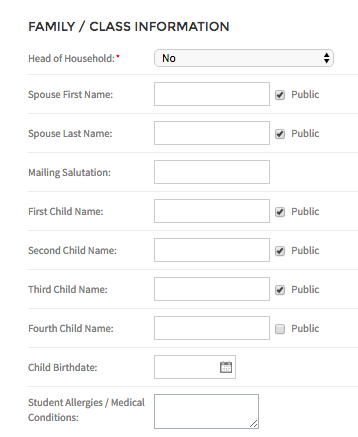
Without a conditional merge tag added in this scenario, the letter received would be addressed “Dear [first name] and ,” leaving an unnecessary and awkward “and ,” at the beginning of the letter.
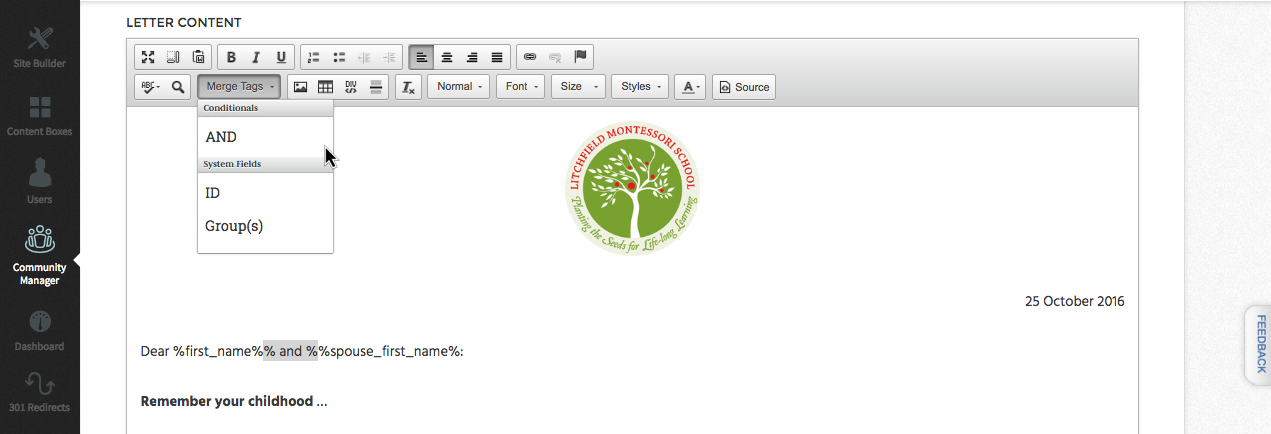
By utilizing a conditional “AND” merge tag, the communication template will only pull a spouse’s name into the template if there is a name within the “Spouse First Name” field in a member’s profile. This means that if there is a name entered in a member’s “Spouse First Name” field, the communication sent to them will read “Dear [first name] and [Spouse first name],”. However, if there is no name entered into a member’s “Spouse First Name” field, the communication they receive will read “Dear [first name],”.


